📱 How Much Does It Cost to Build a Mobile App in 2026: The Complete Guide to Pricing, Timelines & Hidden Costs (iOS & Android)
How much does it really cost to develop an iOS and Android app in 2026? A transparent pricing breakdown across app types, timelines, saving 40% with Flutter, and ongoing post-launch maintenance.
Table of contents22 topics
“How much does it cost to build a mobile app?” is easily the most frequent, confusing question for founders launching digital startups or companies modernizing legacy operations.
Search the web or request random agency quotes, and you will receive contradictory answers: from dubious freelance ads promising “complete iOS and Android apps for $1,000” to large traditional advertising agencies quoting six-figure budgets between $80,000 and $150,000 for mid-tier complexity.
In 2026, mobile software engineering has reached full architectural maturity. The rise of modern, high-performance cross-platform toolkits like Flutter (Google’s open-source framework) and AI-accelerated workflows have slashed upfront budgets and halved development cycles. Nevertheless, engineering a secure, responsive, and scalable application still demands deep software engineering rigor.
In this guide, we deliver complete transparency:
- Real-world 2026 pricing benchmarks categorized by application complexity and architecture.
- The core technical factors driving the final budget.
- Why engineering with Flutter cuts costs by up to 40% compared to legacy dual-native development (Swift + Kotlin) while delivering identical native 60–120 fps fluid performance.
- Hidden, recurring post-launch expenses that catch founders off-guard (store memberships, cloud databases, push notifications, and annual OS updates).
- How to choose between a senior freelance engineer, a legacy agency, or no-code platforms.
📊 2026 Cost Breakdown by Application Complexity
App pricing is never calculated by arbitrary screen counts: it is determined by backend system integrations, security requirements, concurrency, and core business logic.
Here are current market standards for production-ready, professionally engineered mobile applications:
| App Category | Scope & Core Technical Capabilities | Average Timeline | Estimated Cost Range (2026) |
|---|---|---|---|
| Core MVP / Market Validation | Focused core feature set to validate market demand, user auth, cloud database, polished custom UI/UX, user profile. | 4 – 6 weeks | €4,000 – €8,000 ($4,500 – $9,000) |
| E-commerce / Booking / Catalogs | Shopping cart, Stripe/Apple Pay/Google Pay processing, filterable product catalogs, real-time booking slots and order status. | 6 – 9 weeks | €7,000 – €16,000 ($8,000 – $18,000) |
| Social / Community / Marketplaces | Real-time chat, GPS geolocation, personalized algorithmic feeds, segmented push alerts, image/video processing. | 8 – 14 weeks | €14,000 – €28,000 ($16,000 – $32,000) |
| Enterprise / AI-Powered / Logistics | Integrated AI agents, fine-tuned LLM reasoning, offline-first sync with internal ERP/CRM, biometric security and encrypted vaults. | 12 – 20+ weeks | €22,000 – €55,000+ ($25,000 – $65,000+) |
💡 Instant Estimate: Want an immediate budget calculation tailored to your exact feature wishlist? You can calculate your budget in 60 seconds with our interactive mobile app cost calculator.
⚙️ 1. What Truly Drives the Final App Price?
When a senior engineer or technical architect structures a project quote, effort is evaluated across 5 fundamental development domains:
┌─────────────────────────────────────────────────────────────┐
│                 5 CORE DRIVERS OF APP COST                  │
├─────────────────────────────────────────────────────────────┤
│ 1. Bespoke UI/UX Design (Figma, ergonomics, user testing)   │
├─────────────────────────────────────────────────────────────┤
│ 2. Front-End Engineering (Screens, transitions, navigation) │
├─────────────────────────────────────────────────────────────┤
│ 3. Back-End Architecture & APIs (Database, auth, security)  │
├─────────────────────────────────────────────────────────────┤
│ 4. Third-Party Integrations (Payments, AI, GPS, Webhooks)   │
├─────────────────────────────────────────────────────────────┤
│ 5. Physical Device QA & Store Distribution (Apple & Google) │
└─────────────────────────────────────────────────────────────┘
1. Bespoke UI/UX Design vs Off-the-Shelf Templates
Generic, poorly spaced apps are abandoned within 3 minutes by 77% of users. Professional UI/UX design requires mapping user journeys, clickable wireframe prototypes in Figma, accessibility testing, and meticulous micro-interaction design to maximize user retention.
2. Backend Infrastructure, Databases, and Real-Time Sync
If your app only displays static data (like an offline reference handbook), development overhead is minimal. However, if it requires real-time data synchronization across thousands of concurrent users, media storage, REST/GraphQL APIs, and role-based permissions (PostgreSQL, Supabase, or Firebase), backend development represents 35–45% of total engineering effort.
3. Payment Gateways & In-App Purchases
Implementing PCI-compliant checkout flows (SCA, PSD2, automated tax handling) via Stripe, Apple Pay, or Google Pay requires banking-level security. Furthermore, distinguishing between physical goods and digital in-app subscriptions (which trigger Apple and Google’s 15–30% platform fee) requires specific store billing architecture.
4. Artificial Intelligence & Cognitive Agents
In 2026, leading applications incorporate native intelligence: from on-device OCR document scanning to voice dictation and autonomous AI agents powered by frontier models (Claude 3.5 Sonnet, GPT-4o) assisting users with personalized workflows.
5. Multi-Device Real Hardware Testing
Emulators on a developer’s laptop are never sufficient. Production apps must be stress-tested across dozens of actual physical smartphones: varying form factors, foldables, dynamic islands, high-refresh OLED displays, heterogeneous camera sensors, and fragmented Android vendor skins (Samsung One UI, Google Pixel, Xiaomi HyperOS).
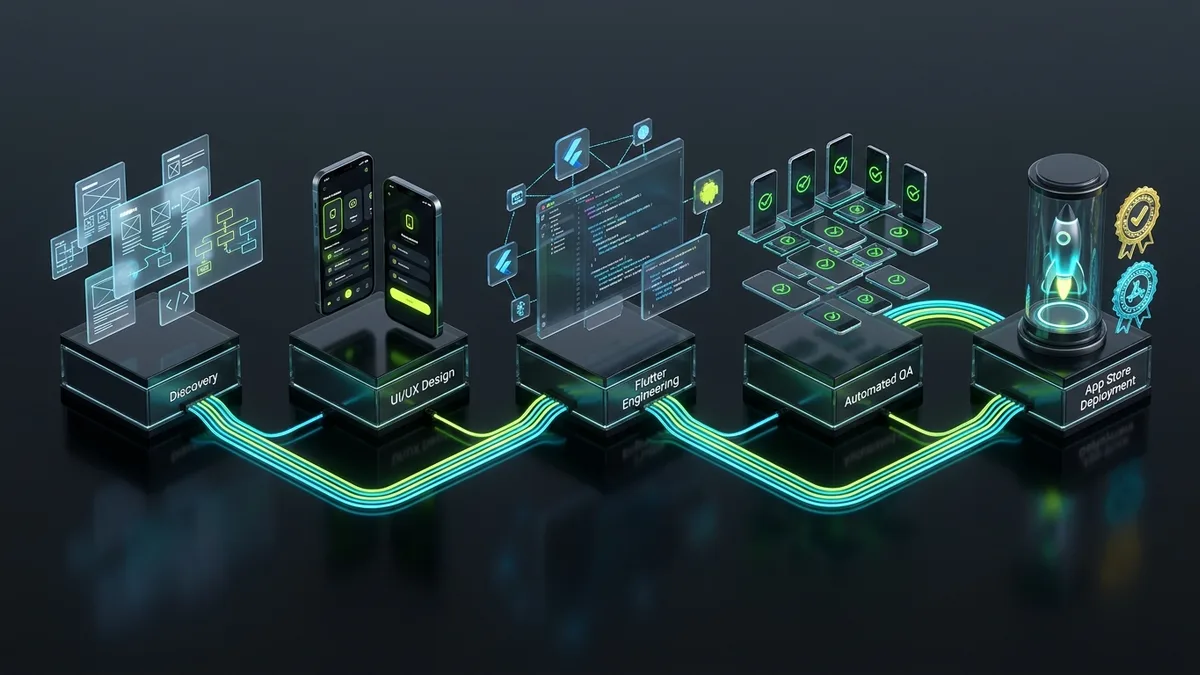
🚀 2. Separate Native Codebases vs Flutter: How to Save 40%
Until recently, building a production app for iPhone and Android required funding two completely separate development teams:
- An iOS team writing Swift / Objective-C in Xcode.
- An Android team writing Kotlin / Java in Android Studio.
This approach doubled initial engineering budgets, delayed launch schedules, and made maintenance expensive: every single feature modification or bug fix had to be engineered twice and manually synchronized.
The Flutter Paradigm Shift
With Flutter, Google’s open-source framework adopted by global enterprises like BMW, Alibaba, eBay, and Philips, developers write one unified Dart codebase that compiles directly into native ARM machine code for both operating systems.
   ┌────────────────────────────────────────────────────────┐
   │         LEGACY APPROACH (DUAL NATIVE TEAMS)            │
   ├────────────────────────────┬───────────────────────────┤
   │ iOS Codebase (Swift/Xcode) │ Android Code (Kotlin)     │
   │ 👥 Engineering Team A      │ 👥 Engineering Team B     │
   │ 💸 Cost: 100% Base Budget  │ 💸 Additional +100% Cost  │
   │ ⏱️ Desynchronized Sprints   │ ⏱️ Two Distinct Rollouts  │
   └────────────────────────────┴───────────────────────────┘
                               VS
   ┌────────────────────────────────────────────────────────┐
   │             MODERN APPROACH WITH FLUTTER               │
   ├────────────────────────────────────────────────────────┤
   │               Single Unified Dart Codebase             │
   │ 👥 One Focused Senior Engineer / Dedicated Team        │
   │ 💸 Immediate 35–40% Budget Savings                     │
   │ ⚡ 60–120 fps Native Fluidity on iOS & Android         │
   │ 🔄 Instant Synchronized Feature Rollouts Across Both   │
   └────────────────────────────────────────────────────────┘
Real-world benefits for your business:
- 35–40% Initial Budget Savings: Instead of funding two fragmented teams, invest in a unified, coordinated sprint.
- Halved Time-to-Market: Launch simultaneously on both the Apple App Store and Google Play Store.
- Uncompromised 60–120 fps Performance: Flutter avoids slow web views or JavaScript runtime bridges: it renders every pixel directly via Google’s modern GPU graphics engine, Impeller.
- Rapid Long-Term Maintenance: Every new feature update or security patch applies to both ecosystems concurrently.
📌 Real-World Case Study: This is the exact engineering methodology powering Melarossa, Italy’s leading personalized diet and nutrition mobile app with over 6 million downloads and a sustained 4.5-star rating on the App Store and Google Play.
👥 3. Development Options: Senior Freelancer vs Agency vs No-Code
When commissioning an app, three primary delivery channels exist:
| Delivery Channel | Core Strengths | Trade-offs & Limitations | Best Fit For |
|---|---|---|---|
| Senior Freelance Engineer | Optimal price-to-quality ratio, direct technical communication, zero agency markups, high personal accountability. | Limited throughput (takes on only a few select projects concurrently). | Startups, SMBs, and growing businesses wanting enterprise-grade engineering without agency overhead. |
| Traditional Large Agency | Large team rosters with specialized micro-roles (account managers, copywriters, PMs, designers, testers). | Very high costs ($40,000 to $150,000+) to cover corporate overhead; code is often outsourced or delegated to junior hires. | Multinational corporations, state institutions, and banks with massive procurement budgets. |
| No-Code Builders (Bubble, FlutterFlow) | Lowest upfront cost and visual prototyping in days. | Severe vendor lock-in, escalating monthly SaaS tiers, performance caps, non-exportable code, difficult scalability. | Disposable proof-of-concepts, internal tools, or non-commercial prototypes. |
🧾 4. Essential Ongoing Post-Launch Expenses
A common mistake among first-time founders is assuming software costs end on launch day. To build a sound financial plan, account for these recurring operating costs:
1. Official Developer Memberships
- Apple Developer Program: Costs $99 / year and is mandatory to distribute apps on the iOS App Store and run TestFlight beta cohorts.
- Google Play Console: A one-time registration fee of $25 (no recurring annual dues).
2. Cloud Databases & API Hosting
During early validation, modern BaaS platforms like Supabase or Firebase provide generous free tiers. As your user base scales past tens of thousands of active users, cloud infrastructure costs generally range between $30 and $150 / month, scaling with database queries and file storage bandwidth.
3. Push Notifications & Transactional Emails
Basic push delivery is free via Apple APNs and Google FCM. If deploying advanced marketing segmentation tools (OneSignal, Customer.io) or transactional mailers (Resend, SendGrid), plans scale gracefully from $0 to $30+/month.
4. Annual Operating System Maintenance
Every autumn, Apple rolls out major iOS updates (iOS 19, iOS 20…) and Google updates Android. Both platforms enforce mandatory target SDK upgrades, new privacy declarations, and compatibility patches. Without scheduled maintenance, apps risk breaking or facing store delisting.
- Standard Rule of Thumb: Budget approximately 15–20% of your initial development cost annually for continuous OS compatibility, security updates, and performance monitoring.
❓ Frequently Asked Questions (FAQ)
Will I own 100% of the application source code?
Yes, absolutely. When working with a professional software engineer, full ownership of the Git repository, documented source code, Figma design systems, and cloud credentials transfers to your company upon final milestone payment. Never accept contracts that “lease” your app’s code via perpetual recurring royalties.
How are development payments structured?
The most transparent, balanced structure is a milestone-based agreement:
- 30% upon kickoff, following detailed discovery and technical contract execution.
- 40% upon approval of the interactive UI prototype and alpha test build on physical devices.
- 30% final balance, upon User Acceptance Testing (UAT) and successful store submission.
Can I build for just iOS or Android first to save money?
With Flutter, building for both platforms simultaneously requires negligible extra effort (roughly 10–15% more for platform-specific store certificates, screenshots, and metadata). Limiting your launch to a single platform halves your addressable market for minimal cost savings.
How long does store approval take?
Once development is finalized:
- Apple App Store: Averages 24 to 48 hours for review by Apple’s human app evaluation team.
- Google Play Store: Typically 1 to 3 business days for established accounts (up to 7 days for new personal developer accounts undergoing closed testing phases).
How can I protect my product idea before sharing details?
Before sharing proprietary documents, roadmaps, or business models, we execute a mutual Non-Disclosure Agreement (NDA), guaranteeing complete professional confidentiality.
💡 Conclusion: Starting on the Right Foot
Building a successful mobile application doesn’t require spending a fortune on bloated agencies, nor should you settle for fragile shortcuts that fail App Store review. Success lies in carefully planning a focused MVP addressing your users’ genuine pain points, leveraging modern cost-efficient technologies like Flutter, and partnering with an experienced engineer to turn your vision into a scalable, high-performance product.
If you are an early-stage founder or startup team, explore our comprehensive deep dive: MVP Development for Startups in 2026: Real Costs, Timeline & Tech Stack Guide.